How Do Fax Machines Actually Work?
The fax machine was invented in 1843 — yes, before the telephone. It's been improved over nearly two centuries, but the core concept remains elegantly simple: convert a document into signals, send those signals over a wire, and reconstruct the document on the other end.
Let's open up the machine and see how each step actually works.
Step 1: Scanning the Document
When you place a document into a fax machine and press "Send," the machine does something remarkably similar to what a flatbed scanner does. A light source illuminates the page line by line, and a sensor (usually a CCD or CIS array) reads the reflected light.
The sensor converts each line into a grid of tiny dots — pixels. A standard fax at 200 DPI resolution creates a grid of 1,728 pixels across the width of an A4 page. Each pixel is recorded as either black or white. There's no grayscale in standard fax.
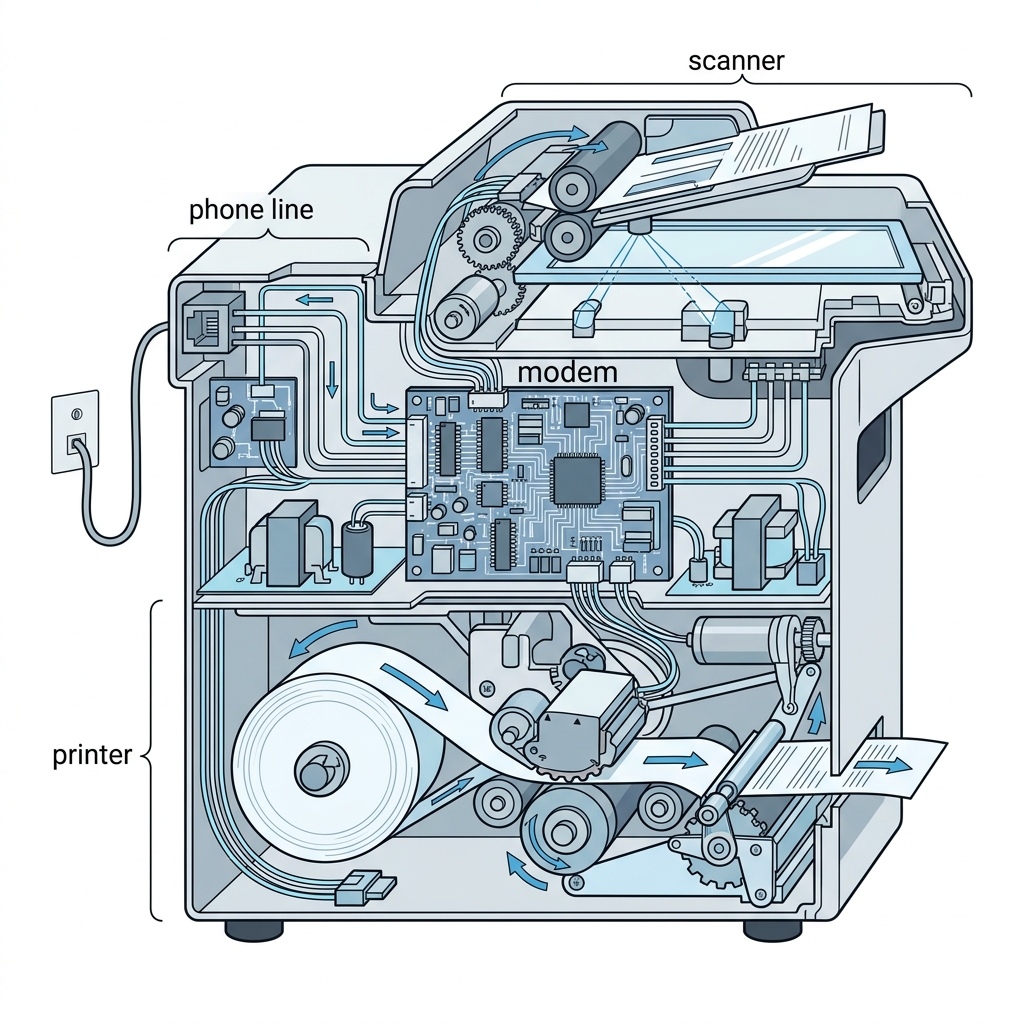
Inside a fax machine: the scanner, modem, and printer each handle a distinct phase of the process.
Step 2: Encoding and Compression
Raw pixel data would take too long to send. A single page at 200 DPI produces about 3.7 million bits. Sending that uncompressed over a phone line at 14,400 bps would take over 4 minutes per page.
Instead, the fax machine uses compression algorithms — primarily Modified Huffman (MH) coding. This algorithm looks for runs of consecutive white or black pixels and replaces them with shorter codes. Since most documents are mostly white space, compression typically reduces the data by 10x or more.
How Huffman Coding Works (Simplified)
Imagine a line that has 100 white pixels, then 20 black pixels, then 80 white pixels. Instead of sending each pixel individually (200 bits), Huffman encoding sends something like: "100 white, 20 black, 80 white" — far fewer bits to transmit the same information.
Step 3: Modulation (Modem)
Phone lines carry analog audio signals, not digital data. The fax machine's built-in modem converts the compressed digital data into audio tones — literally sounds that travel through the phone line.
If you've ever picked up a phone while a fax was sending, you've heard these tones: the distinctive screeching and buzzing is actually encoded data.
- V.17 modems — Transmit at up to 14,400 bps (standard speed)
- V.34 modems — Transmit at up to 33,600 bps (Super G3 fax machines)
Step 4: Handshake Protocol
Before data transmission begins, the sending and receiving machines perform a "handshake" — a negotiation to agree on speed, resolution, and compression method.
- The receiving machine picks up the call and sends a CED tone (a 2,100 Hz whistle lasting 3.3 seconds)
- Both machines exchange capabilities (speed, resolution support)
- They agree on the highest common settings
- Data transmission begins
This entire handshake takes about 6–10 seconds. It's why there's always a delay between dialing and the actual transmission starting.
Step 5: Transmission
The compressed, modulated data travels through the Public Switched Telephone Network (PSTN). This is the same infrastructure used for voice calls. The signal may travel through copper wires, fiber optic cables, and phone company switches before reaching the destination.
A typical page takes about 30–60 seconds to transmit at standard resolution. Higher resolution (fine mode at 200×196 DPI) doubles the data and roughly doubles the transmission time.
Step 6: Receiving and Printing
The receiving machine reverses the entire process:
- The modem demodulates the audio tones back into digital data
- The compression algorithm decompresses the data back into pixel rows
- The printer reproduces each line of pixels onto paper
Older machines used thermal printing (heat-sensitive paper that yellows over time). Modern machines use laser or inkjet printing for permanent output.
Error Correction Mode (ECM)
Phone lines aren't perfect. Static, crosstalk, and signal degradation can corrupt data. ECM breaks the transmission into blocks of 256 bytes and adds error-checking codes. If a block arrives corrupted, the receiving machine asks for just that block to be re-sent.
ECM significantly improves reliability but adds a small amount of time to each transmission.
The Legacy Continues
Whether you're faxing from a 1990s machine or a modern online fax service, the underlying principles are remarkably similar. The main difference? Online fax replaces the phone line with the internet, skipping the analog conversion entirely and delivering documents as digital files.